原文:5 Performance Tips for Node.js Applications
“If #nginx isn’t sitting in front of your node server, you’re probably doing it wrong.” Bryan Hughes on Twitter
“如果在 Node 服务前面没有架设 #nginx ,那你很可能做的就不对”,Bryan Hughes 在 Twitter 上说。
Node.js is the leading tool for creating server applications in JavaScript, the world’s most popular programming language. Offering the functionality of both a web server and an application server, Node.js is now considered a key tool for all kinds of microservices-based development and delivery. (Download a free Forrester report on Node.js and NGINX.)
Node.js 是世界上最领先的用 JavaScript —— 世界上最流行的编程语言 —— 创建服务端应用的工具。Node.js 同时提供了 Web 服务器和应用服务器的功能,现在被认为是基于微服务开发和交付的重要工具。(下载免费的关于 Nodejs 和 NGINX 的 Forrester 报告)
Node.js can replace or augment Java or .NET for backend application development.
Node.js 可以替代或增强 Java 或 .NET 的后端应用程序开发。
Node.js is single-threaded and uses non-blocking I/O, allowing it to scale and support tens of thousands of concurrent operations. It shares these architectural characteristics with NGINX and solves the C10K problem – supporting more than 10,000 concurrent connections – that NGINX was also invented to solve. Node.js is well-known for high performance and developer productivity.
Node.js 是单线程(single-threaded)的,使用无阻塞(non-blocking) I/O,便于扩展,支持成千上万的并发操作。它和 NGINX 共享这些架构特性,解决了 C10K 问题(支持超过 10,000 并发连接),这也是发明 NGINX 要解决的问题。
So, what could possibly go wrong?
那么,这还有什么问题?
Node.js has a few weak points and vulnerabilities that can make Node-based systems prone to underperformance or even crashes. Problems arise more frequently when a Node.js-based web application experiences rapid traffic growth.
Node.js 有一些缺陷和弱点会使基于 Node 的服务表现不佳,甚至崩溃。随着基于 Node 的 Web 应用程序快速增长,这些问题出现地也越来越平凡。
Also, Node.js is a great tool for creating and running application logic that produces the core, variable content for your web page. But it’s not so great for serving static content – images and JavaScript files, for example – or load balancing across multiple servers.
Node.js 同样是用来构建和运行应用逻、生成动态页面内容的优秀的工具。但是它在处理静态内容上面不是非常有优势,比如图片,JavaScript 文件。还有在多服务器之间实现负载均衡也不如意。
To get the most out of Node.js, you need to cache static content, to proxy and load balance among multiple application servers, and to manage port contention between clients, Node.js, and helpers, such as servers running Socket.IO. NGINX can be used for all of these purposes, making it a great tool for Node.js performance tuning.
除了 Node.js,你还需要缓存静态内容,在多个应用服务中间做代理和负载均衡,在客户端,Nodejs 和辅助工具(比如 Socket.IO 服务) 之间管理端口占用。NGINX 可以来做这些事情,使得 Node.js 的性能发生重大转变。
Use these tips to improve Node.js application performance:
- Implement a reverse proxy server
- Cache static files
- Balance loads across multiple servers
- Proxy WebSocket connections
- Implement SSL/TLS and HTTP/2
下面这些建议可以提高 Node.js 应用程序的性能
- 实现一个反向代理服务器
- 缓存静态文件
- 多服务器之间负载均衡
- 代理 WebSocket 连接
- 实现 SSL/TLS 和 HTTP/2
Note: A quick fix for Node.js application performance is to modify your Node.js configuration to take advantage of modern, multi-core servers. Check out this article to learn how to have Node.js spawn separate child processes – equal to the number of CPUs on your web server. Each process then somewhat magically finds a home on one and only one of the CPUs, giving you a big boost in performance.
注意:要快速改善 Node.js 应用程序性能的一个方法是修改 Node.js 配置,利用现代多核服务器的优势。阅读这篇文章来了解如何使 Node.js 产生多个独立的子进程,进程的个数等于 Web 服务器上 CPU 的内核数。每个进程会神奇地找到自己的位置,使用其中的一个 CPU,这会这性能上有非常大提升。
We at NGINX, Inc. are always a bit horrified when we see application servers directly exposed to incoming Internet traffic, used at the core of high-performance sites. This includes many WordPress-based sites, for example, as well as Node.js sites.
在 NGINX 公司,当我们看到应用服务器直接暴露在外部网络流量中,作为高性能站点的核心,有总会有点吃惊。这包括很多基于 WordPress 的站点,Node.js 网站也是如此。
Node.js, to a greater extent than most application servers, is designed for scalability, and its web server side can handle a lot of Internet traffic reasonably well. But web serving is not the raison d’etre for Node.js – not what it was really built to do.
Node.js 很大程度上比大多数应用服务器更加容易扩展,其 web 服务器端可以很好地处理很多网络流量,但是 web 服务不是 Node.js 存在的理由,这不是它要做的事情。
If you have a high-traffic site, the first step in increasing application performance is to put a reverse proxy server in front of your Node.js server. This protects the Node.js server from direct exposure to Internet traffic and allows you a great deal of flexibility in using multiple application servers, in load balancing across the servers, and in caching content //internal link//.
如果你有一个高流量的站点,提高应用服务性能的第一步就是在 Node.js 服务前面架设一个反向理服务器。这样做能避免 Node.js 服务直接暴露在网络流量中,并且可以让你更灵活地处理多个应用服务器,包括跨服务器之间的负载均衡和内容缓存 //内部链接//。
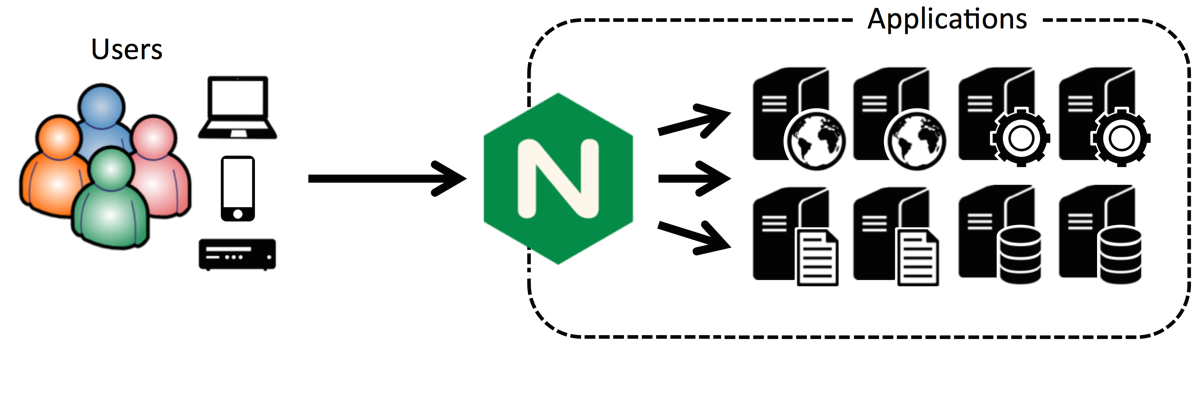
Putting NGINX in front of an existing server setup as a reverse proxy server, followed by additional uses, is a core use case for NGINX, implemented by tens of millions of websites all over the world.
将 NGINX 架设在已有的服务前面作为一个反向代理服务器,作为 NGINX 重要的用途之一,与其他用途一道被世界上成千上万的站点所运用。
There are specific advantages to using NGINX as a Node.js reverse proxy server, including:
- Simplifying privilege handling and port assignments
- More efficiently serving static images (see next tip)
- Managing Node.js crashes successfully
- Mitigating DoS attacks
使用 NGINX 作为 Node.js 反向代理服务器有很多具体的好处,其中包括:
- 简化权限控制和端口分配
- 更有效地提供静态文件(见下节)
- 管理 Node.js 崩溃问题
- 减少 DoS 攻击
Note: These tutorials explain how to use NGINX as a reverse proxy server in Ubuntu 14.04 or CentOS environments, and they are useful overview for anyone putting NGINX in front of Node.js.
注意:一些教程解释了在 Ubuntu 14.04 和 CentOS 环境下如何把 NGINX 当作为反向代理服务器使用,对于所有要将 NGINX 架设在 Node.js 前面的人都是非常有用的概述。
As usage of a Node.js-based site grows, the server will start to show the strain. There are two things you want to do at this point:
- Get the most out of the Node.js server.
- Make it easy to add application servers and load balance amongst them.
随着使用基于 Node.js 服务的站点的增长,这些服务逐渐承受了很多压力。这时候你需要做两件事情:
- 把大部分东西从 Node.js 服务上分离开
- 让应用服务器扩容和实现负载均衡变得简单
This is actually easy to do. Begin by implementing NGINX as a reverse proxy server, as described in the previous tip. This makes it easy to implement caching, load balancing (when you have multiple Node.js servers), and more.
事实上这很容易做到,通过像上一节中讲的将 NGINX 作为一个反向代理服务器,很容易实现缓存,负载均衡(当有多个 Node.js 服务器时)等。
The website for Modulus, an application container platform, has a useful article on supercharging Node.js application performance with NGINX. With Node.js doing all the work on its own, the author’s site was able to serve an average of nearly 900 requests per second. With NGINX as a reverse proxy server, serving static content, the same site served more than 1600 requests per second – a performance improvement of nearly 2x.
Modulus 网站,是一个应用程序容器平台,上面有一篇文章,是关于用 NGINX 提升 Node.js 应用性能的文章。让 Node.js 完成所有工作,这位作者的网站可以提供平均每秒大约 900 次请求。用 NGINX 作为反向代理服务器,提供静态内容,同样的站点可以提供每秒超过 1600 次请求,性能提升接近 2 倍。
Doubling performance buys you time to take additional steps to accommodate further growth, such as reviewing (and possibly improving) your site design, optimizing your application code, and deploying additional application servers.
性能翻倍你就会有时间继续寻找新的增长点,例如评审(或者改善)网站的设计,优化程序代码,部署额外的应用服务器等。
Following is the configuration code that works for a website running on Modulus:
下面是一段运行在 Moduluss 上的一个网站的配置代码:
server {
  listen 80;
  server_name static-test-47242.onmodulus.net;

  root /mnt/app;
  index index.html index.htm;

  location /static/ {
	   try_files $uri $uri/ =404;
  }

  location /api/ {
	   proxy_pass http://node-test-45750.onmodulus.net;
  }
}
This detailed article from Patrick Nommensen of NGINX, Inc explains how he caches static content from his personal blog, which runs on the Ghost open source blogging platform, a Node.js application. Although some of the details are Ghost-specific, you can reuse much of the code for other Node.js applications.
这篇来自 NGINX 公司 Patrick Nommensen 的文章,解释了他的个人博客是如何缓存静态内容的,他的博客运行在开源的 Ghost 博客平台上,这是一个 Node.js 应用,尽管一些特定的细节是针对 Ghost 的,你仍然可以在其他 Node.js 应用上复用大部分的代码。
For instance, in the NGINX location block, you’ll probably want to exempt some content from being cached. You don’t usually want to cache the administrative interface for a blogging platform, for instance. Here’s configuration code that disables [or exempts] caching of the Ghost administrative interface:
例如,在 NGINX 配置的 location 块中,你可能不想让一些内容被缓存。比如不想缓存博客平台的管理界面。下面是一段禁用 Ghost 管理界面缓存的代码:
location ~ ^/(?:ghost|signout) {
  proxy_set_header X-Real-IP $remote_addr;
  proxy_set_header Host $http_host;
  proxy_pass http://ghost_upstream;
  add_header Cache-Control "no-cache, private, no-store,
  must-revalidate, max-stale=0, post-check=0, pre-check=0";
}
For general information about serving static content, see the NGINX Plus Admin Guide. The Admin Guide includes configuration instructions, multiple options for responding to successful or failed attempts to find a file, and optimization approaches for achieving even faster performance.
想了解关于提供静态文件的一般信息,可以参考 NGINX Plus Admin Guide。这篇管理指南包括配置说明、正对请求文件成功或者失败的多种可选的返回,以及若干优化的方式来实现更好的性能。
Caching of static files on the NGINX server significantly offloads work from the Node.js application server, allowing it to achieve much higher performance.
使用 NGINX 服务器提供静态文件大大减轻了 Node.js 应用服务器的负担,使它可以实现更高好的性能。
The real key to high – that is, nearly unlimited – performance for Node.js applications is to run multiple application servers and balance loads across all of them.
真正的 Node.js 高性能(就是说几乎没有上限)的关键是运行多个应用服务器,在它们中间实现负载均衡。
Node.js load balancing can be particularly tricky because Node.js enables a high level of interaction between JavaScript code running in the web browser and JavaScript code running on the Node.js application server, with JSON objects as the medium of data exchange. This implies that a given client session runs continually on a specific application server, and session persistence is inherently difficult to achieve with multiple application servers.
Node.js 的负载均衡可能会特别棘手,因为 Node.js 采用了 Web 浏览器中的 JavaScript 代码 和 Node.js 应用服务器上代码 之间的高层次交互,使用 JSON 对象作为数据交互的媒介。这意味着,给定客户端的会话持续运行在一个特定的应用服务器上,多个应用服务器上 Session 持久性问题在根本上很难解决。
One of the major advantages of the Internet and the web are their high degree of statelessness, which includes the ability for client requests to be fulfilled by any server with access to a requested file. Node.js subverts statelessness and works best in a stateful environment, where the same server consistently responds to requests from any specific clients.
Internet 和 Web 的一个优势是高度的无状态性,使得人任何服务器只要可以访问被访问的文件都可以处理来自客户端的请求。Node.js 是反无状态的,最擅长在有状态的环境下工作,同一个服务器可以不断地响应来自任何客户端的请求。
This requirement can best be met by NGINX Plus, rather than the open source NGINX software. The two versions of NGINX are quite similar, but one major difference is their support for different load balancing algorithms.
这个需求可以用 NGINX Plus 得到最好的实现,而不是开源的 NGINX 软件。这两个版本的 NGINX 非常像,但是其中一个主要的区别是它们支持不同的负载均衡算法。
NGINX supports stateless load balancing methods:
- Round Robin. A new request goes to the next server in a list.
- Least Connections. A new request goes to the server that has the fewest active connections.
- IP Hash. A new request goes to the server assigned to a hash of the client’s IP address.
NGINX 支持无状态的负载均衡方法:
- 轮询调度 一个新的请求转到列表中的下一个服务器
- 最少连接 一个新的请求转到有最少活动连接的服务器
- IP 哈希 一个新的请求转到分配了客户端 IP 地址哈希值的服务器
Only one of these methods, IP Hash, reliably sends a given client’s requests to the same server, which benefits Node.js applications. However, IP Hash can easily lead to one server receiving a disproportionate number of requests, at the expense of other servers, as described in this blog post about load balancing techniques. This method supports statefulness at the expense of potentially suboptimal allocation of requests across server resources.
IP 哈希,这些方法的其中之一,能可靠地发送一个客户端的请求到相同的服务器,这对 Node.js 应用程序是有好处的。然而,IP 哈希很容易导致一个服务器接收到大量的请求,损失了其他服务器,正如这篇文章关于负载均衡技术的描述。以潜在的跨服务器间的资源分配为代价,此方法可支持有状态性。
Unlike NGINX, NGINX Plus supports session persistence. With session persistence in use, the same server reliably receives all requests from a given client. The advantages of Node.js, with its stateful communication between client and server, and NGINX Plus, with its advanced load balancing capability, are both maximized.
和 NGINX 不同,NGINX Plus 支持 session 持久化。使用 session 持久化,同一个服务器可以可靠地接受来自给定客户端的所有请求。Node.js 的优势是支持客户端和服务器间有状态的通信,NGINX Plus 有高级的负载均衡功能,都可以达到最大化。
So you can use NGINX or NGINX Plus to support load balancing across multiple Node.js servers. Only with NGINX Plus, however, are you likely to achieve both maximum load-balancing performance and Node.js-friendly statefulness. The application health checks and monitoring capabilities built into NGINX Plus are useful here as well.
所以你可以用 NGINX 或者 NGINX Plus 的负载均衡支持 Node.js 跨服务器间的负载均衡。如果只用 NGINX Plus,你就可以实现最优的负载均衡以及 Node.js 友好的有状态性。NGINX Plus 内置的应用状况检查和监控功能在这里同样有用。
NGINX Plus also supports session draining, which allows an application server to gracefully complete current sessions after a request for the server to take itself out of service.
NGINX Plus 同样支持 session 释放,可以让应用服务器结束一个请求之后优雅地完成当前会话。
HTTP, in all versions, is designed for “pull” communications, where the client requests files from the server. WebSocket is a tool to enable “push” and “push/pull” communications, where the server can proactively send files that the client hasn’t requested.
所有的 HTTP 版本,被设计为“拉取”的通信方式,是客户端请求服务器的方式。WebSocket 开启了“推送”和“推送/拉取”的通信方式,服务器可以主动推送客户端没有请求的文件。
The WebSocket protocol makes it easier to support more robust interaction between client and server while reducing the amount of data transferred and minimizing latency. When needed, a full-duplex connection, with client and server both initiating and receiving requests as needed, is achievable.
WebSocket 协议使得客户端和服务器之间支持更强的交互,同时减少了数据传输量和延迟。在需要的时候,就可以开启一个全双工的连接,客户端和服务器都会启动并接受请求。
WebSocket protocol has a robust JavaScript interface and as such is a natural fit for Node.js as the application server – and, for web applications with moderate transaction volumes, as the web server as well. When transaction volumes rise, it makes sense to insert NGINX between clients and the Node.js web server, using NGINX or NGINX Plus to cache static files and to load balance among multiple application servers.
WebSocket 协议有一个稳健的 JavaScript 接口,很适合 Node.js 作为应用服务器,同样可作为适度业务量的 web 应用程序, 也适合作为 web 服务器。当业务量增加时,将 NGINX 设在客户端和 Node.js 服务器之间,使用 NGINX 或 NGINX Plus 缓存静态文件,并且在多个应用服务器之间配置负载均衡,是很有意义的。
Node.js is often used in conjunction with Socket.IO – a WebSocket API that has become quite popular for use along with Node.js applications. This can cause port 80 (for HTTP) or port 443 (for HTTPS) to become quite crowded, and the solution is to proxy to the Socket.IO server. You can use NGINX for the proxy server, as described above, and also gain additional functionality such as static file caching, load balancing, and more.
Node.js 经常会和 Socket.IO 一起使用,Socket.IO 是一个 Node.js 应用程序中很流行的一个 WebSocket API。这可能造成 80端口(HTTP)和443端口(HTTPS)非常拥挤,解决办法是代理到 Socket.IO 服务器上。如上所述,你可以使用 NGINX 作为代理服务器,也可以获得额外的功能,如静态文件缓存,负载均衡等。
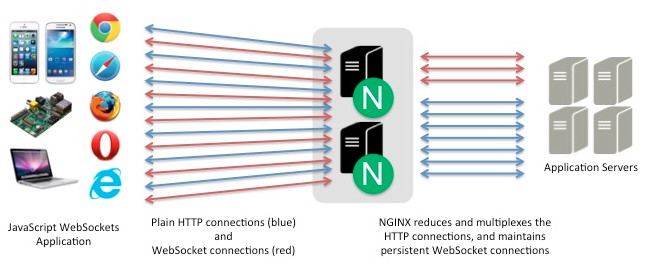
Following is code for a server.js node application file that listens on port 5000. It acts as a proxy server (not a web server) and routes requests to the proper port:
下面的代码是一个 node 应用程序的 server.js 文件,监听 5000 端口,它会作为一个代理服务器(非 web 服务器)将请求发送适当的端口:
var io = require('socket.io').listen(5000);

io.sockets.on('connection', function (socket) {
  socket.on('set nickname', function (name) {
    socket.set('nickname', name, function () {
      socket.emit('ready');
    });
  });

  socket.on('msg', function () {
    socket.get('nickname', function (err, name) {
      console.log('Chat message by ', name);
    });
  });
});
Within your index.html file, add the following code to connect to your server application and instantiate a WebSocket between the application and the user’s browser:
在 index.html 文件中,添加一些代码来连接到服务器,在应用程序和用户浏览器之间初始化一个 WebSocket 连接。
<script src="/socket.io/socket.io.js"></script>
<script>
    var socket = io(); // your initialization code here.
</script>
For complete instructions, including NGINX configuration, see our blog post for using NGINX and NGINX Plus with Node.js and Socket.IO. For more depth about potential architectural and infrastructure issues for web applications of this kind, see our blog post about real-time web applications and WebSocket.
要了解完整的说明,包括 NGINX 配置,参见我们的这篇使用 NGINX 和 NGINX Plus 结合 Node.js 和 Socket.IO 的文章。要了解更多关于类似 web 应用程序基础架构搭建的话题,可以参考我的文章:实时的 web 应用程序和 WebSocket。
More and more sites are using SSL/TLS to secure all user interaction on the site. It’s your decision whether and when to make this move, but if and when you do, NGINX supports the transition in two ways:
- You can terminate an SSL/TLS connection to the client in NGINX, once you’ve set up NGINX as a reverse proxy. The Node.js server sends and receives unencrypted requests and content back and forth with the NGINX reverse proxy server.
- Early indications are that using HTTP/2, the new version of the HTTP protocol, may largely or completely offset the performance penalty that is otherwise imposed by the use of SSL/TLS. NGINX supports HTTP/2 and you can terminate HTTP/2 along with SSL, again eliminating any need for changes in the Node.js application server(s).
越来越多的站点使用 SSL/TLS 保证所有用户交互的安全性。当然是你来决定是否已经适合去这样做,但是如果你要做的话,NGINX 可支持两种交互方式:
- 只要使用 NGINX 当作反向代理,就可以在 NGINX 里处理一个 SSL/TLS 连接到客户端。Node.js 服务器和 NGINX 反向代理服务器来回地发送和接收未加密的请求和内容。
- 有迹象表明使用 HTTP/2,新版本的 HTTP 协议,可以大部分或者完全抵消使用 SSL/TLS 的性能损失。NGINX 对 HTTP/2 做了支持,你可以结合 SSL 来处理 HTTP/2,避免修改任何的 Node.js 应用。
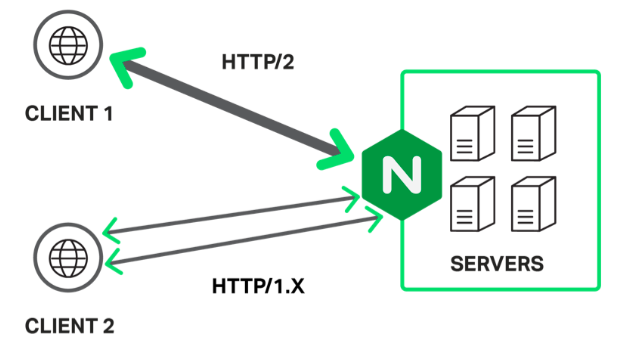
Among the implementation steps you need to take are updating the URL in the Node.js configuration file, establishing and optimizing secure connections in your NGINX configuration, and using SPDY or HTTP/2 if desired. Adding HTTP/2 support means that browser versions that support HTTP/2 communicate with your application using the new protocol; older browser versions continue to use HTTP/1.x.
在实现的步骤中你需要做的是更新 Node.js 配置文件中的 URL,在 NGINX 配置中建立和优化安全连接,如果想要,可以使用 SPDY 或者 HTTP/2。添加 HTTP/2 支持意味着支持和服务器使用 HTTP/2 通信的浏览器使用新的协议,旧版本的浏览器继续使用 HTTP/1.x。
The following configuration code is for a Ghost blog using SPDY, as described here. It includes advanced features such as OCSP stapling. For considerations around using NGINX for SSL termination, including the OCSP stapling option, see here. For a general overview of the same topics, see here.
下面是一个 Ghost 博客使用 SPDY 的配置代码,可以在这里看一下介绍。包括了高级特性比如 OCSP 整合。要考虑使用 NGINX 作为 SSL 终端,包括 OCSP 选项,可以参考这里。要了解同样主题一般的概述,参考这里。
You need make only minor alterations to configure your Node.js application and to upgrade from SPDY to HTTP/2, now or when SPDY support goes away in early 2016.
目前,或者在 2016 年初 SPDY 不支持的时候,从 SPDY 到 HTTP/2,你只需要做很小修改来配置 Node.js 应用程序。
server {
   server_name domain.com;
   listen 443 ssl spdy;
   spdy_headers_comp 6;
   spdy_keepalive_timeout 300;
   keepalive_timeout 300;
   ssl_certificate_key /etc/nginx/ssl/domain.key;
   ssl_certificate /etc/nginx/ssl/domain.crt;
   ssl_session_cache shared:SSL:10m;
   ssl_session_timeout 24h;
   ssl_buffer_size 1400;
   ssl_stapling on;
   ssl_stapling_verify on;
   ssl_trusted_certificate /etc/nginx/ssl/trust.crt;
   resolver 8.8.8.8 8.8.4.4 valid=300s;
   add_header Strict-Transport-Security 'max-age=31536000; includeSubDomains';
   add_header X-Cache $upstream_cache_status;
   location / {
        proxy_cache STATIC;
        proxy_cache_valid 200 30m;
        proxy_cache_valid 404 1m;
        proxy_pass http://ghost_upstream;
        proxy_ignore_headers X-Accel-Expires Expires Cache-Control;
        proxy_ignore_headers Set-Cookie;
        proxy_hide_header Set-Cookie;
        proxy_hide_header X-powered-by;
        proxy_set_header X-Real-IP $remote_addr;
        proxy_set_header X-Forwarded-For $proxy_add_x_forwarded_for;
        proxy_set_header X-Forwarded-Proto https;
        proxy_set_header Host $http_host;
        expires 10m;
    }
    location /content/images {
        alias /path/to/ghost/content/images;
        access_log off;
        expires max;
    }
    location /assets {
        alias /path/to/ghost/themes/uno-master/assets;
        access_log off;
        expires max;
    }
    location /public {
        alias /path/to/ghost/built/public;
        access_log off;
        expires max;
    }
    location /ghost/scripts {
        alias /path/to/ghost/core/built/scripts;
        access_log off;
        expires max;
    }
    location ~ ^/(?:ghost|signout) {
        proxy_set_header X-Real-IP $remote_addr;
        proxy_set_header Host $http_host;
        proxy_pass http://ghost_upstream;
        add_header Cache-Control "no-cache, private, no-store,
        must-revalidate, max-stale=0, post-check=0, pre-check=0";
        proxy_set_header X-Forwarded-Proto https;
    }
}
This blog post describes some of the most important performance improvements you can make in your Node.js applications. It focuses on the addition of NGINX to your application mix alongside Node.js – by using NGINX as a reverse proxy server, to cache static files, for load balancing, for proxying WebSocket connections, and to terminate the SSL/TLS and HTTP/2 protocols.
这篇文章讲述了在 Node.js 应用程序里你可以做的最重要的性能提升建议。关注使用 NGINX 作为反向代理服务器,缓存静态文件,增加负载均衡,代理 WebSocket 连接,实现 SSL/TLS 和 HTTP/2 协议,将 Nginx 加入到你的 Node.js 应用程序里。
The combination of NGINX and Node.js is widely recognized as a way to create new microservices-friendly applications or add flexibility and capability to existing SOA-based applications that use Java or Microsoft .NET. This post helps you optimize your Node.js applications and, if you choose, to bring the partnership between Node.js and NGINX to life.
NGINX 和 Node.js 的结合是一中被广泛采取的方式来创建微服务友好的应用程序。或者为现有的基于 SOA 的 使用 Java 或 .NET 的应用程序增加灵活性和功能。这篇文章会帮你优化你的 Node.js 应用程序,如果你选择这些建议,会带来 Node.js 和 NGINX 之间的合作更有活力。