





A terminal chat client for running local LLMs on consumer hardware. Chat with powerful AI models like Mistral-24B privately on your own RTX 4090/3090 — no cloud, no costs, complete privacy.
Perfect for developers who want a self-hosted ChatGPT alternative running on their gaming PC or homelab server. Also useful for local AI coding assistants, agentic workflows, and agent development.
Named after ZORAC, the intelligent Ganymean computer from James P. Hogan's The Gentle Giants of Ganymede.
Homebrew (macOS/Linux):
brew tap chris-colinsky/zorac
brew install zorac
pip / pipx:
pipx install zorac   # recommended — isolated environment
# or
pip install zorac
# or
uv tool install zorac
Windows: Use WSL, then follow the pip instructions above.
Upgrade anytime with brew upgrade zorac or pipx upgrade zorac.
You need a vLLM inference server running on a machine with an NVIDIA GPU. See Server Setup for a complete walkthrough.
zoracOn first launch, a setup wizard asks for your vLLM server URL and model name (press Enter to accept the defaults). Configuration is saved to ~/.zorac/config.json.
You: Explain how neural networks learn
Assistant: [Response streams in real-time with markdown formatting...]
Stats: 245 tokens in 3.8s (64.5 tok/s) | Total: 4 msgs, ~312/28000 tokens
That's it. Your conversation is automatically saved and restored between sessions.
Interactive chat with real-time streaming responses, markdown rendering, and performance metrics
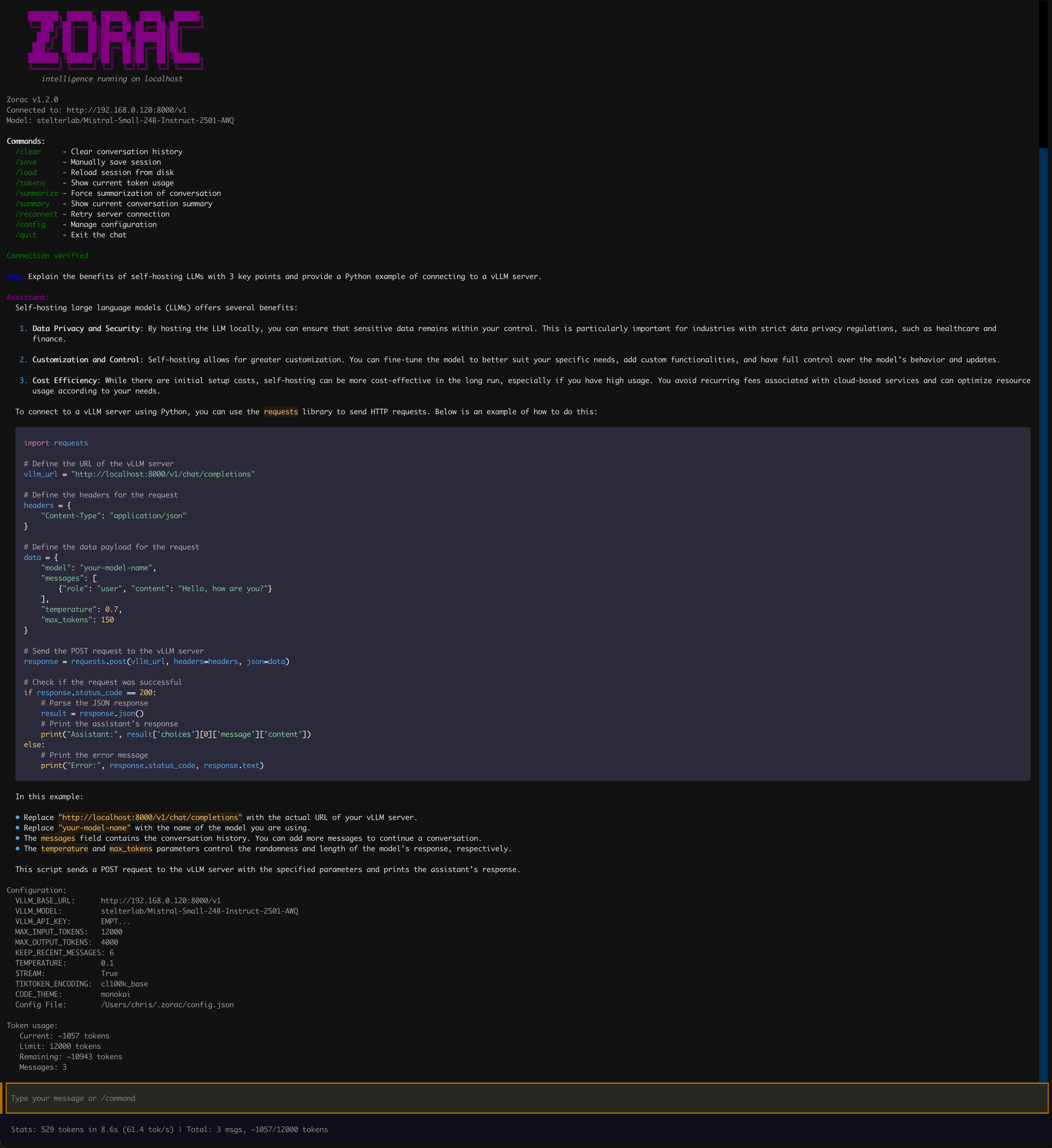
- Rich Terminal UI — Markdown rendering, syntax-highlighted code blocks (configurable theme), left-aligned 60% width layout
- Streaming Responses — Real-time token streaming with live display, or disable for complete responses
- Persistent Sessions — Conversation auto-saves after every response and restores on next launch
- Smart Context Management — Automatically summarizes older messages when approaching token limits, preserving recent context
- Token Tracking — Monitor token usage, limits, and remaining capacity at any time
- Performance Metrics — Tokens/second, response time, and token usage after each response
- Tab Completion — Hit Tab to auto-complete any
/command - Command History — Arrow keys recall previous inputs across sessions
- Multi-line Input — Shift+Enter inserts newlines; paste multi-line text from clipboard
- Offline Capable — No internet required after initial model download
- Fully Configurable — Adjust everything via runtime commands, config file, or environment variables
All commands start with / and auto-complete with Tab:
| Command | Description |
|---|---|
/help |
Show all available commands |
/clear |
Reset conversation and start fresh |
/save |
Manually save the current session |
/load |
Reload session from disk (discards unsaved changes) |
/tokens |
Show current token usage, limits, and remaining capacity |
/summarize |
Force summarization of conversation history |
/summary |
Display the current conversation summary |
/reconnect |
Retry connection to the vLLM server |
/config list |
Show all current settings |
/config set KEY VALUE |
Update a setting (takes effect immediately) |
/config get KEY |
Show a specific setting value |
/quit or /exit |
Save session and exit |
Ctrl+C |
Interrupt a streaming response without exiting |
You can also ask the assistant about commands in natural language — the LLM is aware of all Zorac functionality.
All settings can be changed at runtime without restarting:
You: /config set TEMPERATURE 0.7
✓ Updated TEMPERATURE in ~/.zorac/config.json
✓ Temperature will take effect on next message.
| Setting | Default | Description |
|---|---|---|
| Server | ||
VLLM_BASE_URL |
http://localhost:8000/v1 |
vLLM server endpoint |
VLLM_API_KEY |
EMPTY |
API key (vLLM doesn't require one) |
VLLM_MODEL |
dark-side-of-the-code/Mistral-Small-24B-Instruct-2501-AWQ |
Model to use |
| Model Parameters | ||
TEMPERATURE |
0.1 |
Randomness: 0.0 = deterministic, 0.7 = balanced, 1.0+ = creative |
MAX_OUTPUT_TOKENS |
4000 |
Maximum tokens per response |
STREAM |
true |
Real-time streaming (true) or wait for complete response (false) |
| Context Management | ||
MAX_INPUT_TOKENS |
28000 |
Token budget for system prompt + conversation history |
KEEP_RECENT_MESSAGES |
6 |
Messages preserved when auto-summarization triggers |
| Display | ||
CODE_THEME |
monokai |
Pygments syntax highlighting theme for code blocks |
| Advanced | ||
TIKTOKEN_ENCODING |
cl100k_base |
Token counting encoding (match to your model family) |
Popular code themes: monokai, dracula, github-dark, one-dark, solarized-dark, solarized-light, nord, gruvbox-dark, native
You: /config list

Configuration:
  VLLM_BASE_URL:        http://localhost:8000/v1
  VLLM_MODEL:           dark-side-of-the-code/Mistral-Small-24B-Instruct-2501-AWQ
  VLLM_API_KEY:         EMPT...
  MAX_INPUT_TOKENS:     28000
  MAX_OUTPUT_TOKENS:    4000
  KEEP_RECENT_MESSAGES: 6
  TEMPERATURE:          0.1
  STREAM:               True
  TIKTOKEN_ENCODING:    cl100k_base
  CODE_THEME:           monokai
  Config File:          ~/.zorac/config.json
Settings are resolved in this order (highest priority first):
- Environment variables —
VLLM_BASE_URL="http://..." zorac - Config file —
~/.zorac/config.json(written by/config setor the setup wizard) - Defaults — Built-in values shown in the table above
Source users can also use a .env file in the project root. See Configuration Guide for details.
- Auto-save — Conversations save automatically after each assistant response
- Persistent — Sessions restore when you restart Zorac
- Manual control —
/saveand/loadfor explicit save/restore - Fresh start —
/clearresets to a blank conversation
Zorac tracks tokens to stay within your model's context window:
You: /tokens
📊 Token usage:
   Current: ~3421 tokens
   Limit: 28000 tokens
   Remaining: ~24579 tokens
   Messages: 12
When the conversation exceeds MAX_INPUT_TOKENS, Zorac automatically summarizes older messages while preserving the most recent ones. You can also trigger this manually with /summarize, or view the current summary with /summary.
- Zero ongoing costs — No API fees, run unlimited queries
- Complete privacy — Your data never leaves your machine
- Low latency — Sub-second responses on local hardware
- Use existing hardware — Your gaming GPU works great for AI
- Full control — Customize models, parameters, and behavior
- Work offline — No internet required after initial setup
Runs on consumer gaming GPUs:
| GPU | VRAM | Model Size | Performance |
|---|---|---|---|
| RTX 4090 | 24GB | Up to 24B (AWQ) | 60-65 tok/s |
| RTX 3090 Ti | 24GB | Up to 24B (AWQ) | 55-60 tok/s |
| RTX 3090 | 24GB | Up to 24B (AWQ) | 55-60 tok/s |
| RTX 4080 | 16GB | Up to 14B (AWQ) | 45-50 tok/s |
| RTX 4070 Ti | 12GB | Up to 7B (AWQ) | 40-45 tok/s |
| RTX 3080 | 10GB | Up to 7B (AWQ) | 35-40 tok/s |
See Server Setup for optimization details.
The default model is Mistral-Small-24B-Instruct-2501-AWQ:
- 24B parameters — Significantly better reasoning than 7B/8B models
- 4-bit AWQ quantization — Fits in 24GB VRAM on consumer GPUs
- AWQ + Marlin kernel — 60-65 tok/s on RTX 4090
You can use any vLLM-compatible model (Llama, Qwen, Phi, DeepSeek, etc.) by changing VLLM_MODEL.
- Local ChatGPT alternative — Private conversations, no data collection
- Coding assistant — Works with Continue.dev, Cline, and other AI coding tools
- Agentic workflows — LangChain/LangGraph running entirely local
- Content generation — Write, summarize, analyze — all offline
- AI experimentation — Test prompts and models without API costs
- Learning AI/ML — Understand LLM inference without cloud dependencies
Can I run this without a GPU?
No, this requires an NVIDIA GPU with at least 10GB VRAM. CPU-only inference is too slow for interactive chat.
How does this compare to Ollama?
Zorac uses vLLM for faster inference (60+ tok/s vs Ollama's 20-30 tok/s on the same hardware) and supports advanced features like tool calling for agentic workflows. Ollama is easier to set up but slower.
Do I need to be online?
Only for the initial model download (~14GB for Mistral-24B-AWQ). After that, everything runs completely offline.
Is this legal? Can I use this commercially?
Yes. Mistral-Small is Apache 2.0 licensed (free commercial use). vLLM is also Apache 2.0.
What about AMD GPUs or Mac M-series?
This is specifically for NVIDIA GPUs using CUDA. For AMD, you'd need ROCm support (experimental). For Mac M-series, check out MLX or llama.cpp instead.
How much does it cost to run?
Electricity for an RTX 4090 at ~300W is roughly $0.05-0.10 per hour. Far cheaper than API costs for heavy usage.
How do I copy text from the chat?
Zorac uses mouse reporting for scrolling, which can interfere with native text selection in some terminals. In iTerm2, hold Option (⌥) while clicking and dragging to select text, then copy with Cmd+C as usual. Most terminals support a similar modifier key — check your terminal's documentation for its equivalent.
What other models can I run?
Any model with vLLM support: Llama, Qwen, Phi, DeepSeek, etc. Just change the VLLM_MODEL setting. See vLLM supported models.
- Installation Guide — All installation methods (Homebrew, pip, pipx, source)
- Configuration Guide — Full settings reference and common scenarios
- Usage Guide — Detailed command usage, session management, tips
- Server Setup — Complete vLLM server installation and optimization
- Development Guide — Contributing, testing, release process
- Changelog — Version history and release notes
- Contributing — Contribution guidelines
- NVIDIA GPU with 10GB+ VRAM
- vLLM inference server running on your GPU machine
- Python 3.13+ (if installing from source)
MIT License — see LICENSE for details.
Contributions are welcome! See CONTRIBUTING.md for guidelines.
- Documentation
- Report bugs
- Request features
- vLLM Documentation for server issues
Star this repo if you find it useful!