

Watch the Modulus project video
English · Deutsch
Version: 3.1.5-ota
Author: D. McLean / BufferRoot
Platform: M5Stack Tab5 (ESP32-P4 + ESP32-C6)
Stack: Zig 0.16 + ESP-IDF 6
Hackster: Modulus pendant · M5Stack GIC 2026
License: MIT
Thanks: Special thanks to Sae and Miklos for repeatedly testing the Tab5 ↔ S3 radio link and providing the diagnostics that led to the fixed-channel design.
One Device, One Software. Real control for any machine — no lag, no brand lock-in, no compromise.
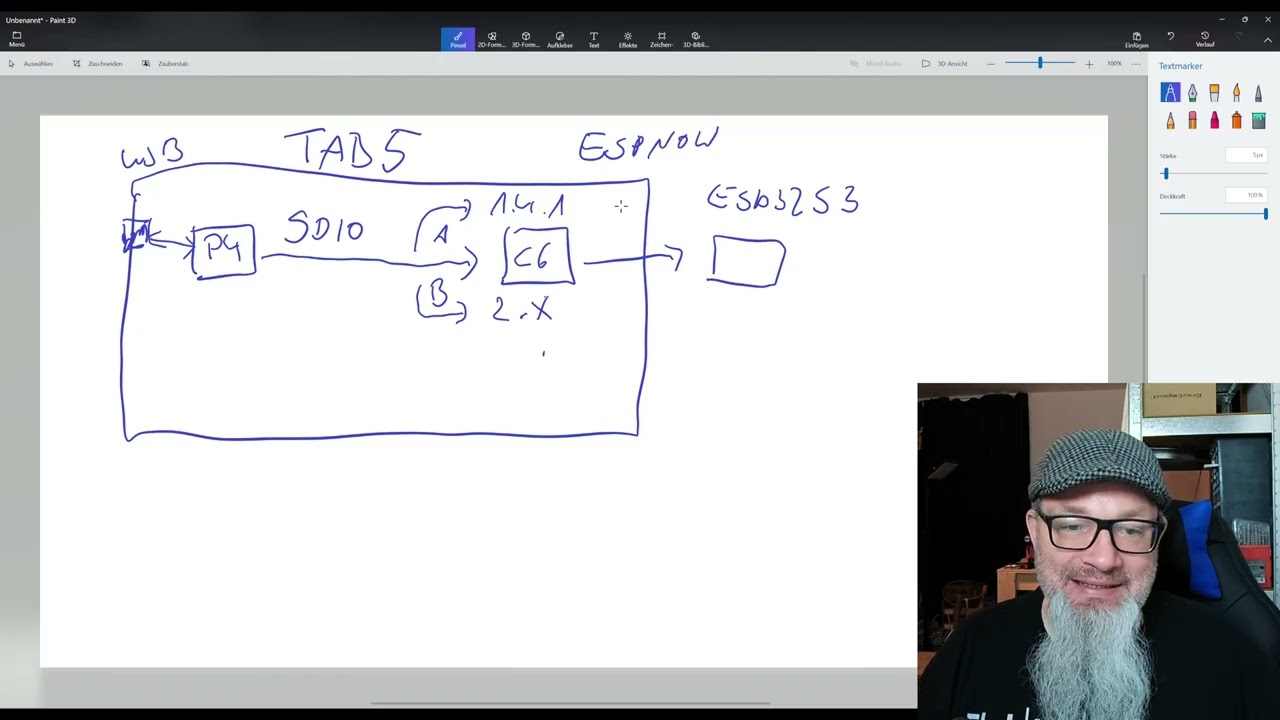
Modulus runs across multiple processors, but the Tab5's ESP32-C6 radio and the cabinet ESP32-S3 bridge traditionally required separate USB/bootloader access. This branch adds guarded C6 Update and S3 Update pages to M Panel. C6 application images travel over the internal ESP-Hosted/SDIO link; S3 application images travel over ESP-NOW. Both updater pages read the root of a FAT-formatted USB-A drive and reject images built for the wrong chip. microSD support was useful during development, but was removed from the updater UI because the slot is inaccessible in many installed enclosures and presenting two maintenance sources made the workflow unnecessarily ambiguous. Other Modulus microSD features are unchanged.
The maintenance sequence is P4 first, then C6 and/or S3: install the P4 firmware containing the OTA UI, boot Modulus normally, and select the matching updater. The XIAO ESP32-S3 needs the OTA-capable full image once over USB; later updates use only its application image. Image inspection, explicit arming, progress feedback, and a guarded restart keep every write deliberate. After a successful C6 activation, the P4 restarts automatically after a short delay to resynchronize the ESP-Hosted/SDIO link. Nothing is flashed automatically.
The complete C6 and XIAO S3 OTA paths, including an S3 update from USB-A and a successful boot from its second OTA slot, have been verified on real hardware.
Important
OTA must be enabled by a one-time wired flash first. Flash the P4 package
over USB so the Tab5 has the OTA menus. A new or previously installed XIAO
ESP32-S3 must then be flashed once over USB at offset 0x0 with
modulus-s3-xiao-full.bin from the latest release. This installs the OTA receiver
and dual-slot partition table. Only after that first flash can subsequent S3
updates use modulus-s3-xiao-ota.bin through M Panel → S3 Update.
Do not send the first-flash/full image through the OTA menu.
For the Tab5 C6, the stock ESP-Hosted firmware already provides slave OTA. The P4 OTA-enabled firmware still has to be installed first before C6 Update is available. If the C6 no longer boots or answers over SDIO, restore its complete flash package over the C6 USB bootloader before using OTA again.
Handheld DRO + MPG client on Tab5 — Zig dual-core anti-lag firmware talking to grblHAL (and other engines) over ESP-NOW or RS-485. It does not replace your motion controller.
Most M5 projects cram UI and radio onto one busy chip. Modulus uses Tab5 as designed: P4 dual-core HMI/control, C6 for Wi-Fi/BLE/ESP-NOW, NanoH2 for Zigbee — so motion RF and shop-IoT RF never fight.
The following overview shows the wired buses, radio links, power connection, and the GPIO assignments currently used by the Tab5, NanoH2, S3 bridge, and external Zigbee node. The ULN2803A relay connection is planned and still awaits the hardware test.

                 [Operator touch UI + MPG wheel]
                              │
                              ▼
┌──────────────────── ESP32-P4 (Tab5 main MCU) ────────────────────┐
│  Core 0: LVGL 720p Material 3 UI · settings · audio (async)      │
│  Core 1: heap-free ~100 Hz MPG poll · envelope · command stream  │
└─────────┬──────────────────────┬───────────────────────┬─────────┘
          │ SDIO2                │ UART GPIO6/7          │ UART1
          ▼                      ▼                       ▼
┌───────────────────┐  ┌───────────────────┐  ┌───────────────────┐
│ ESP32-C6          │  │ NanoH2 (ESP32-H2) │  │ SIT3088 RS-485    │
│ Wi-Fi 6 / BLE /   │  │ ZBOSS Zigbee hub  │  │ wired field bus   │
│ ESP-NOW           │  │ shop automation   │  │                   │
└─────────┬─────────┘  └───────────────────┘  └───────────────────┘
          │ ESP-NOW
          ▼
┌───────────────────┐
│ ESP32-S3 bridge   │ ── UART ──► CNC controller (e.g. grblHAL)
└───────────────────┘
| Target | Job |
|---|---|
| P4 | Core 0 = UI · Core 1 = heap-free ~100 Hz MPG / envelope / streams |
| C6 | Wi-Fi 6, BLE, ESP-NOW only (never Zigbee-exclusive builds) |
| NanoH2 | Zigbee coordinator @ 460800 baud UART — vacuums, lights, fans |
| S3 bridge | Cabinet ESP-NOW → UART to controller |
Why Zig: no GC. Core 1 never touches the allocator, so a heavy Core 0 frame cannot stall the handwheel. Error unions + defer for deterministic transport cleanup. Zig owns state/jog/ABI (src/modulus/); C shims own IDF/BSP/LVGL.
| Shop failure | Fix |
|---|---|
| UI redraw delays jog | Dual-core — Core 1 never blocks on LVGL |
| Wi-Fi reconnect freezes pendant | ESP-NOW is connectionless — drop bad frame, run next |
| Bridge backlog under RF hit | Bounded S3 queue — stale frames drop (50 ms TTL) |
| 10 clicks ≠ 10 steps | envelope.zig clamp + NVS divider/polarity before send |
| UI refresh starves Core 0 | Dashboard timer floor ≥ 33 ms (never 16 ms under sw_rotate) |
Bench numbers (grblHAL + ESP-NOW + S3):
| Metric | Value |
|---|---|
| Wheel-to-motion latency | 2 ms |
| MPG poll (Core 1) | ~100 Hz |
| ESP-NOW RTT (P4↔S3) | 25 ms |
| Late-frame drop TTL | 50 ms |
| UI refresh floor @ 720p | ≥ 33 ms |
| ESP-NOW PHY default | 24M OFDM |
| Cold boot → live DRO | ~16 s |
| Runtime per pack | 8–10+ h (NP-F hot-swap) |
| Feature | Notes |
|---|---|
| Live multi-axis DRO + MPG | ExtEncoder; 0.001–1.0 mm detent steps |
| Overrides / hold / cycle / macros | Native commands — no HID keyboard hacks |
| Multi-engine client | grblHAL, Grbl, FluidNC, LinuxCNC, Mach3/4, Masso |
| Multi-transport | ESP-NOW, RS-485, USB serial, WebSocket, Telnet, BLE |
| Zigbee shop IoT | NanoH2 hub — Run can start dust extraction; Hold/Alarm spins down |
| Material 3 UI | Dark/light + accents · 10 settings tabs · Quick Settings · PIN lock |
| Power | INA226 (%, V, A, W) · NP-F hot-swap · PMIC soft shutdown |
Honest status: pendant stack complete; grblHAL over ESP-NOW (Tab5↔S3) field-verified. Full motion soak + live Zigbee soak still open. Other engines/transports implemented, not all field-verified. Keep the machine E-Stop in reach.
✅ field-verified · 🔧 implemented · ⏳ planned
| Transport | Path | Status |
|---|---|---|
| ESP-NOW | C6 → air → S3 → UART | ✅ |
| RS-485 | UART1 TX20 / RX21 / DE34 | 🔧 |
| USB serial | Direct USB / UART | 🔧 |
| WebSocket | C6 Wi-Fi | 🔧 |
| Telnet | C6 Wi-Fi | 🔧 |
| BLE | NimBLE on C6 | 🔧 |
| I2C | Bus peer | 🔧 |
| CAN | via COMMU | ⏳ |
| Engine | Typical transport | Status |
|---|---|---|
| grblHAL | ESP-NOW / RS-485 | ✅ |
| Classic Grbl | RS-485 / serial | 🔧 |
| FluidNC | WebSocket | 🔧 |
| LinuxCNC | Telnet | 🔧 |
| Mach3 / Mach4 | Telnet | 🔧 |
| Masso | WebSocket / UDP | 🔧 |
Pendant E-Stop is a convenience layer, not a safety-rated cutoff. It rides the active link (GPIO16 NO → feed-hold ! then soft reset). If the wireless link is down, pendant E-Stop will not stop the machine. Machine mushroom E-Stop is primary. Software: envelope.zig soft limits, zero-while-running confirm, link-offline warnings, low-battery MPG lockout.
Out of scope (roadmap): SC2356 camera UI · on-screen FFT · PCNT GPIO quadrature (replace I²C ExtEncoder).
src/modulus/         Zig: state, jog math, cnc_proto, envelope, ABI
firmware/tab5/       P4 app: IDF/BSP/LVGL C shims + modulus_zig
firmware/tab5-c6/    C6 ESP-Hosted wireless slave
firmware/nanoh2/     H2 Zigbee coordinator (ZBOSS)
firmware/s3-bridge/  ESP-NOW → UART bridge
cad/                 STL + CAD (enclosure / mounts)
schematics/          Schematics + wiring diagrams
assets/              README media (hero image)
scripts/             Build / flash helpers
tools/               NVS manifest generator (used by zig build)
LICENSE              MIT
Download the firmware from the latest GitHub release. The Releases tab always contains the current installation files and checksums.
- A full image contains everything required for a clean wired installation
and clears old settings. Flash it at address
0x0. - Select
modulus-tab5-full.binfor Tab5. - Select
modulus-s3-generic-full.binormodulus-s3-xiao-full.binfor the matching S3 board. - An S3 OTA image is used for subsequent updates from the Tab5 S3 update menu.
Connect the target through its normal USB port and write the matching single
full BIN at address 0x0. This installs the complete bootloader, partition table,
and application. Example for a XIAO S3:
python -m esptool --chip esp32s3 -p COM8 erase-flash
python -m esptool --chip esp32s3 -p COM8 write-flash 0x0 modulus-s3-xiao-full.bin
Replace COM8 with the actual port. Use the generic full image for a generic S3.
See FLASH-README.md in the release for the complete Tab5 and S3 commands.
Copy the matching modulus-s3-*-ota.bin from the latest release to the USB stick root. Open
M Panel → S3 → Firmware Update, then Refresh USB → Check S3 image → Flash S3.
After successful verification select Restart S3. Set matching S3 MAC/channel
under Settings → Wireless if required.
Prerequisites: Zig 0.16+ · ESP-IDF 6.0
git clone https://github.com/BufferRoot/Modulus-Firmware.git
cd Modulus-Firmware
zig build test        # host logic + ABI parity
zig build tab5-lib # freestanding Zig library| Target | Command |
|---|---|
| Tab5 P4 | .\scripts\build_tab5.ps1 then .\scripts\flash_tab5.ps1 -Port COM5 |
| Tab5 C6 | Build with scripts/build_tab5_c6_modulus.ps1, then install the app via the Tab5 C6 update menu |
| NanoH2 | idf.py -C firmware/nanoh2 flash (hold BUTTON; enable EXT5V) |
| S3 bridge | .\scripts\build_s3_bridge.ps1 -Action flash -Port COM8 |
| S3 XIAO | same image: USB shell board xiao (or factory -Board xiao) then flash |
Use the build scripts — plain
idf.py buildis not supported for Tab5 P4.
scripts/build_tab5.ps1runsscripts/patch_tab5_idf6_deps.ps1first, which patches the managed components for ESP-IDF 6:esp_hosted's CMakeLists for the movedsdmmcheaders, a retry-safegpio_reset_pinbefore GPIO reconfigure, and the Modulus SDIO diagnostics/drain constants. Those files live undermanaged_components/, which is gitignored and regenerated by the component manager — so the patches are reapplied on every build and are lost afteridf.py fullcleanor a dependency re-solve.Running
idf.py builddirectly gives an image that either fails to compile or boots with a broken SDIO link to the C6 (sdmmc_send_cmd returned 0x107).
dependencies.lockis tracked for every firmware. Do not delete it to "get newer components": an unpinned re-solve pulls releases that assume a newer IDF than 6.0.1 and the build breaks (#2).
Host regression test for C6 OTA: python scripts/test_c6_ota.py (requires Zig).
| Signal | Pin | Note |
|---|---|---|
| RS-485 TX / RX / DE | GPIO 20 / 21 / 34 | onboard SIT3088 |
| ExtEncoder MPG | Grove Port A (I2C) | powered via EXT5V_EN |
| Hardware E-Stop | GPIO16 (M5-Bus pin 2) | NO to GND, pull-up |
| NanoH2 UART | GPIO 6 TX / 7 RX | 460800 baud |
Tab5 · ExtEncoder + wheel · industrial NO E-Stop · Stamp NanoH2 · ESP32-S3 cabinet bridge · NP-F pack(s) · optional COMMU Module Extend.
Mechanical files: cad/ · Wiring / schematics: schematics/.