-
Notifications
You must be signed in to change notification settings - Fork 13
New Guide Article : "Microbots : Introduction, Installation Guide and Creating Your First MicroBot" and structural changes in blog #132
New issue
Have a question about this project? Sign up for a free GitHub account to open an issue and contact its maintainers and the community.
By clicking “Sign up for GitHub”, you agree to our terms of service and privacy statement. We’ll occasionally send you account related emails.
Already on GitHub? Sign in to your account
Open
shivashanmugam
wants to merge
25
commits into
main
Choose a base branch
from
siva/getting-started-with-microbots
base: main
Could not load branches
Branch not found: {{ refName }}
Loading
Could not load tags
Nothing to show
Loading
Are you sure you want to change the base?
Some commits from the old base branch may be removed from the timeline,
and old review comments may become outdated.
Open
Changes from all commits
Commits
Show all changes
25 commits
Select commit
Hold shift + click to select a range
9a1040a
microbots intro
shivashanmugam 31097a8
removing app.js file from the examples folder
shivashanmugam 8eaac5d
fix pr comments
shivashanmugam 41cb5a2
remove the os import
shivashanmugam 69a627e
Merge remote-tracking branch 'origin/main' into siva/getting-started-…
shivashanmugam c1272af
fix comments
shivashanmugam 06b333b
change python to python3
shivashanmugam 441a4e1
changes getting started
shivashanmugam a7f4714
update getting started with minimal text as suggessted
shivashanmugam b459d87
first bot changes
shivashanmugam 7efb73c
Merge remote-tracking branch 'origin/main' into siva/getting-started-…
shivashanmugam 206175a
change blog to blog posts
shivashanmugam a35b180
fix title and quick start icon
shivashanmugam 11dea06
remove home markdown file
shivashanmugam 0b1ae73
update getting started
shivashanmugam 8dc76e3
getting-started changes
shivashanmugam 43f89c7
remove unwanted image
shivashanmugam f4a1178
resolve pr comments
shivashanmugam 691a41d
asset folder changes and resolve pr comments
shivashanmugam afad9d3
resolve comments on installation guide article, microbots installatio…
shivashanmugam f23e783
better info text
shivashanmugam 9f466ff
add better info text
shivashanmugam c565f53
Merge branch 'siva/getting-started-with-microbots' of https://github.…
shivashanmugam 0a57e13
add explanation for bot construct and bot.run as per pr comment
shivashanmugam 0c9c08e
resolve pr comments
shivashanmugam File filter
Filter by extension
Conversations
Failed to load comments.
Loading
Jump to
Jump to file
Failed to load files.
Loading
Diff view
Diff view
There are no files selected for viewing
This file contains hidden or bidirectional Unicode text that may be interpreted or compiled differently than what appears below. To review, open the file in an editor that reveals hidden Unicode characters.
Learn more about bidirectional Unicode characters
| Original file line number | Diff line number | Diff line change |
|---|---|---|
| @@ -1,97 +1,80 @@ | ||
| # 🤖 Microbots | ||
|
|
||
| MicroBots is a lightweight, extensible AI agent for code comprehension and controlled file edits. It integrates cleanly | ||
| into automation pipelines, mounting a target directory with explicit read-only or read/write modes so LLMs can safely | ||
| inspect, refactor, or generate files with least‑privilege access. | ||
| MicroBots is a lightweight, extensible AI agent for code comprehension and controlled file edits. It integrates cleanly into automation pipelines, mounting a target directory with explicit read-only or read/write modes so LLMs can safely inspect, refactor, or generate files with least-privilege access. | ||
|
|
||
|
|
||
| ```py | ||
| from microbots import WritingBot | ||
|
|
||
| myWritingBot = WritingBot( | ||
| model="azure-openai/my-gpt5", # model format : <provider/deployment_model_name> | ||
| folder_to_mount=str("myReactApp"), | ||
| ) | ||
|
|
||
| data = myWritingBot.run("""when doing npm run build, I get an error. | ||
| Fix the error and make sure the build is successful.""", timeout_in_seconds=600) | ||
| print(data.results) | ||
| ``` | ||
|
|
||
| ## 🚀 How to install | ||
| ## 🚀 Quick Start | ||
|
|
||
| ### Pre-requisites | ||
|
|
||
| - Docker | ||
| - AI LLM Provider and API Key | ||
|
|
||
| ### Install Microbots | ||
| ### Install | ||
|
|
||
| ```bash | ||
| pip install microbots | ||
| ``` | ||
|
|
||
| ### Example | ||
|
|
||
| ## ✨LLM Support | ||
| ```python | ||
| from microbots import WritingBot | ||
|
|
||
| Azure OpenAI Models - Add the below environment variables in a `.env` file in the root of your application | ||
| myWritingBot = WritingBot( | ||
| model="azure-openai/my-gpt5", | ||
| folder_to_mount=str("myReactApp"), | ||
| ) | ||
|
|
||
| ```env | ||
| AZURE_OPENAI_ENDPOINT=XXXXXXXXXXXXXXXXXXXXXXXXXX | ||
| AZURE_OPENAI_API_KEY=XXXXXXXXXXXXXXXXXXXXXXXXXXXXXXXXXXXXXXXXXXXXXXXXXXXX | ||
| AZURE_OPENAI_API_VERSION=2025-03-01-preview | ||
| data = myWritingBot.run( | ||
| "Fix the build error and make sure the build is successful.", | ||
| timeout_in_seconds=600, | ||
| ) | ||
| print(data.results) | ||
| ``` | ||
|
|
||
| ## 🤖 Bots & Usage Examples | ||
|
|
||
| Pre-requisite for the below example code of Bots: | ||
| From the root of your application, Create a folder called `code` inside which clone the repo `https://github.com/swe-agent/test-repo/`. Now run the code | ||
|
|
||
|
|
||
| ### 📖 ReadingBot | ||
|
|
||
|
|
||
| ```py | ||
| from microbots import ReadingBot | ||
|
|
||
| myBot = ReadingBot( | ||
| model="azure-openai/my-gpt5", | ||
| folder_to_mount="code" | ||
| ) | ||
| ## 🤖 Available Bots | ||
|
|
||
| runResult = myBot.run("When I am running missing_colon.py I am getting SyntaxError: invalid syntax. Find the error and explain me what is the error", timeout_in_seconds=600) | ||
| print(runResult) | ||
| | Bot | Description | | ||
| | ------------------ | ---------------------------------------------------------------------- | | ||
| | **ReadingBot** | Reads files and extracts information based on instructions (read-only) | | ||
| | **WritingBot** | Reads and writes files based on instructions (read/write) | | ||
| | **BrowsingBot** | Browses the web to gather information | | ||
| | **LogAnalysisBot** | Analyzes logs for debugging | | ||
| | **AgentBoss** | Orchestrates multiple bots for complex tasks | | ||
|
|
||
| ``` | ||
| ## ⚙️ How it works | ||
|
|
||
| The `ReadingBot` will read the files inside `code` folder and will extract information based on specific instructions given to the bot. | ||
| 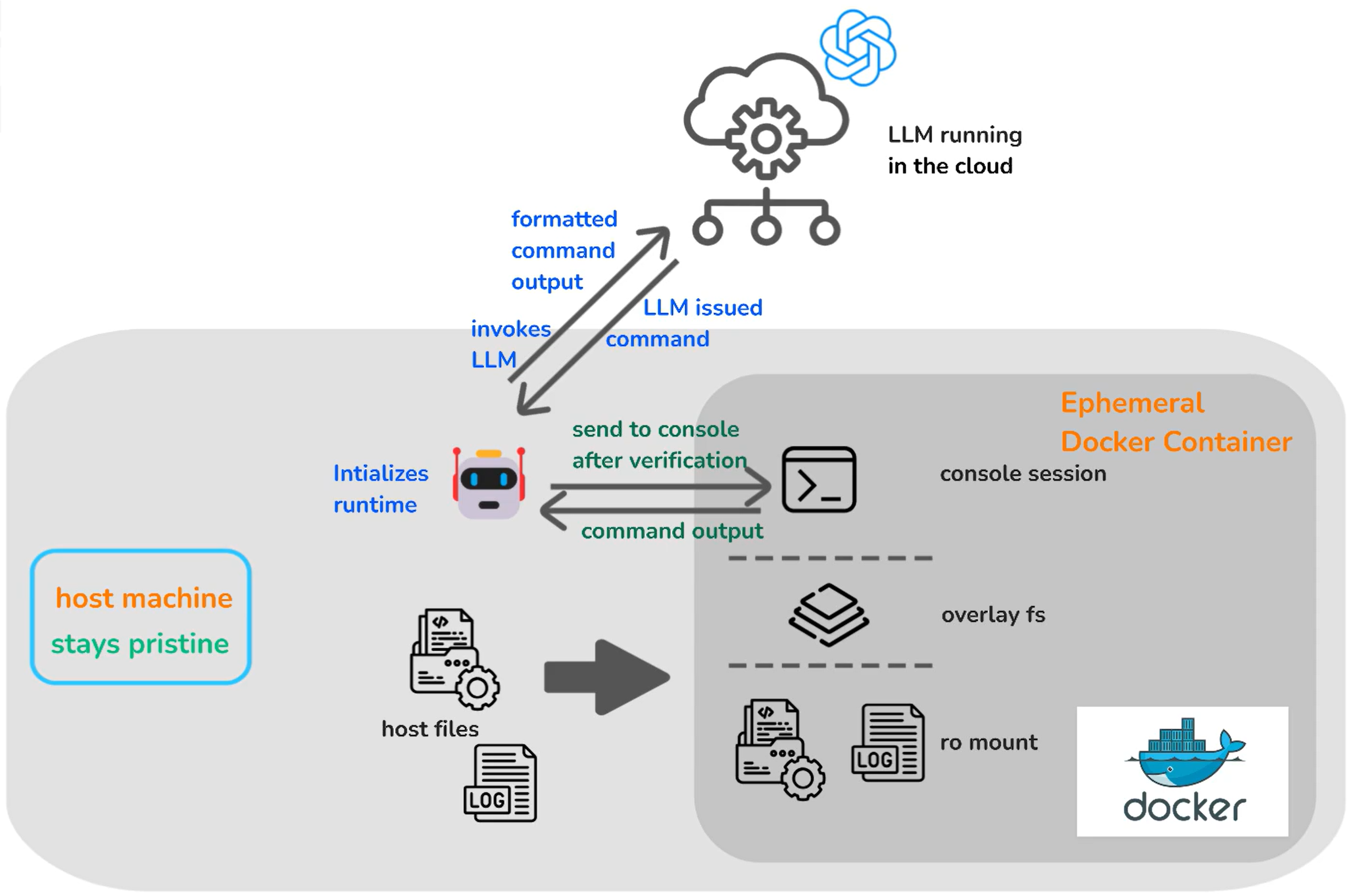 | ||
|
|
||
| MicroBots creates a containerized environment and mounts the specified directory, restricting permissions to read-only or read/write based on the Bot used. This ensures AI agents operate within defined boundaries, enhancing security and control over code modifications while protecting the local environment. | ||
|
|
||
| ### ✍️ WritingBot | ||
| ## ✨ LLM Support | ||
|
|
||
| Pre-requisite for the example code: | ||
| From the root the application, Create a folder called `code` inside which clone the repo `https://github.com/swe-agent/test-repo/`. Now run the code | ||
| Microbots supports multiple LLM providers — pick whichever fits your stack: | ||
|
|
||
| ```py | ||
| from microbots import WritingBot | ||
| | Provider string | Description | | ||
| | --------------- | ---------------------------------------------------------- | | ||
| | `openai` | OpenAI or Azure OpenAI via the OpenAI SDK (API key) | | ||
| | `azure-openai` | Azure OpenAI via the Azure SDK (API key or Azure AD token) | | ||
| | `anthropic` | Anthropic models, direct or via Azure AI Foundry | | ||
| | `ollama-local` | Local models via [Ollama](https://ollama.com/) | | ||
|
|
||
| myBot = WritingBot( | ||
| model="azure-openai/my-gpt5", | ||
| folder_to_mount="code" | ||
| ) | ||
| Each provider has its own set of environment variables (endpoint, API key, deployment name, etc.). See the [Authentication guide](https://microsoft.github.io/microbots/advanced/authentication/) for the exact `.env` variables required for each provider and for Azure AD / managed identity setup. | ||
|
|
||
| myBot.run("When I am running missing_colon.py I am getting SyntaxError: invalid syntax. Fix the error and make sure the code runs without any errors.", timeout_in_seconds=600) | ||
| ``` | ||
| ## 📚 Links | ||
|
|
||
| The `WritingBot` will read and write the files inside `code` folder based on specific instructions given to the bot. | ||
| - [GitHub Repository](https://github.com/microsoft/microbots) | ||
| - [Contributing Guide](https://github.com/microsoft/microbots/blob/main/CONTRIBUTING.md) | ||
| - [Code of Conduct](https://github.com/microsoft/microbots/blob/main/CODE_OF_CONDUCT.md) | ||
|
|
||
| ## ⚙️ How it works | ||
| --- | ||
|
|
||
| ## 🎯 Getting Started | ||
|
|
||
|  | ||
| Ready to build your first Microbot project? Follow the step-by-step onboarding guide: | ||
|
|
||
| The MicroBots create a containerized environment and mount the specified directory with restricting the permissions to read-only or read/write based on Bot used. It ensures that the AI agents operate within defined boundaries which enhances security and control over code modifications as well as protecting the local environment. | ||
| ➡️ **[Get Started with Microbots](https://microsoft.github.io/microbots/getting-started/prerequisites/)** | ||
|
|
||
| #Legal Notice | ||
| ## Legal Notice | ||
|
|
||
| Trademarks This project may contain trademarks or logos for projects, products, or services. Authorized use of Microsoft trademarks or logos is subject to and must follow Microsoft’s Trademark & Brand Guidelines. Use of Microsoft trademarks or logos in modified versions of this project must not cause confusion or imply Microsoft sponsorship. Any use of third-party trademarks or logos are subject to those third-party’s policies. | ||
| Trademarks: this project may contain trademarks or logos for projects, products, or services. Authorized use of Microsoft trademarks or logos is subject to and must follow Microsoft's Trademark & Brand Guidelines. Use of Microsoft trademarks or logos in modified versions of this project must not cause confusion or imply Microsoft sponsorship. Any use of third-party trademarks or logos are subject to those third-party's policies. |

File renamed without changes

File renamed without changes

File renamed without changes

File renamed without changes
File renamed without changes.
This file contains hidden or bidirectional Unicode text that may be interpreted or compiled differently than what appears below. To review, open the file in an editor that reveals hidden Unicode characters.
Learn more about bidirectional Unicode characters
File renamed without changes.
Oops, something went wrong.
Oops, something went wrong.
Add this suggestion to a batch that can be applied as a single commit.
This suggestion is invalid because no changes were made to the code.
Suggestions cannot be applied while the pull request is closed.
Suggestions cannot be applied while viewing a subset of changes.
Only one suggestion per line can be applied in a batch.
Add this suggestion to a batch that can be applied as a single commit.
Applying suggestions on deleted lines is not supported.
You must change the existing code in this line in order to create a valid suggestion.
Outdated suggestions cannot be applied.
This suggestion has been applied or marked resolved.
Suggestions cannot be applied from pending reviews.
Suggestions cannot be applied on multi-line comments.
Suggestions cannot be applied while the pull request is queued to merge.
Suggestion cannot be applied right now. Please check back later.
Uh oh!
There was an error while loading. Please reload this page.