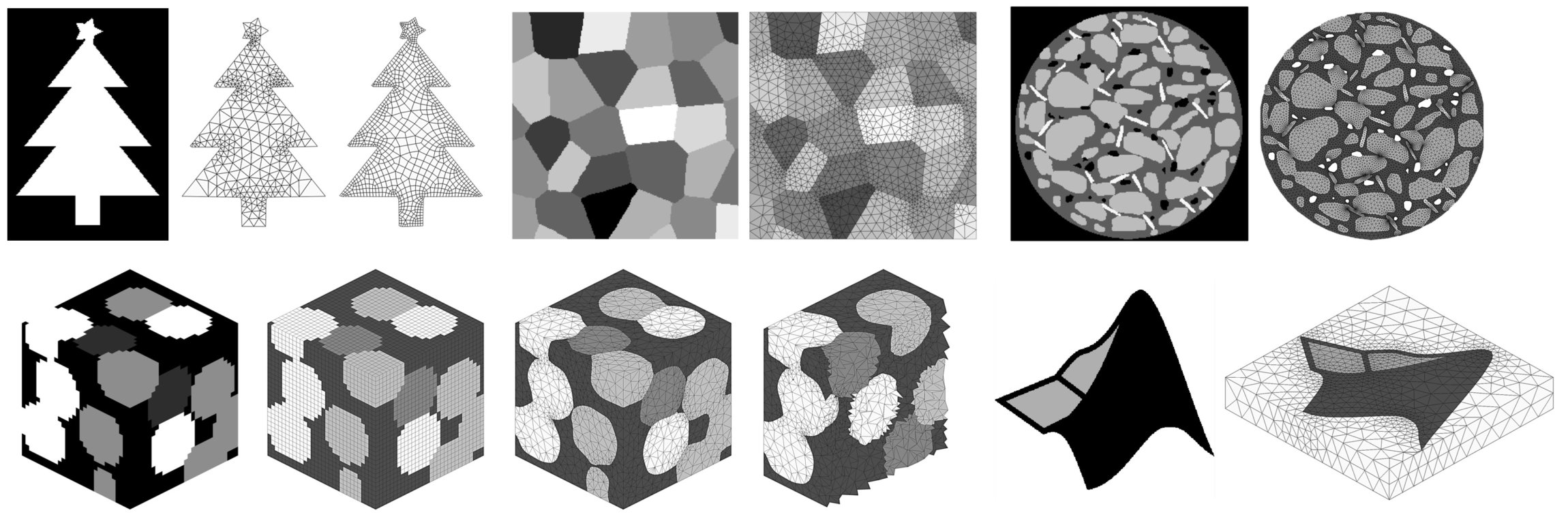
Im2mesh is an open-source MATLAB/Octave package for generating finite element mesh based on 2D or 3D multi-phase image. It provides a robust workflow capable of processing various input images, such as microstructure images of engineering materials. Due to its generalized framework, Im2mesh can handle segmented image with more than 10 phases. Im2mesh was originally released on MathWorks File Exchange in 2019.
Im2mesh can also be used as a mesh generation interface for MATLAB 2D multi-part geometry, aka multi-domain or multi-phase geometry (see demo14-17).
Downloads:
- Im2mesh package
- GUI version for 2D image (MATLAB app)
- GUI version for 2D image (Standalone desktop application & No need to install MATLAB)
News:
- Version 2.60 can generate tetrahedral mesh based on 3D voxel image! See demo20 and Gallery.
- Version 2.45 can export image boundaries as
dxffile (CAD). - Version 2.2.0 can use Gmsh as mesh generator (quadrilateral mesh).
Features (for 2d):
- Accurately preserve the contact details between different phases.
- Incorporates polyline smoothing and simplification
- Able to edit polygonal boundary before mesh generation.
- Support phase selection and local mesh refinement.
- 4 mesh generators are available for selection: MESH2D, generateMesh, Gmsh, and pixelMesh.
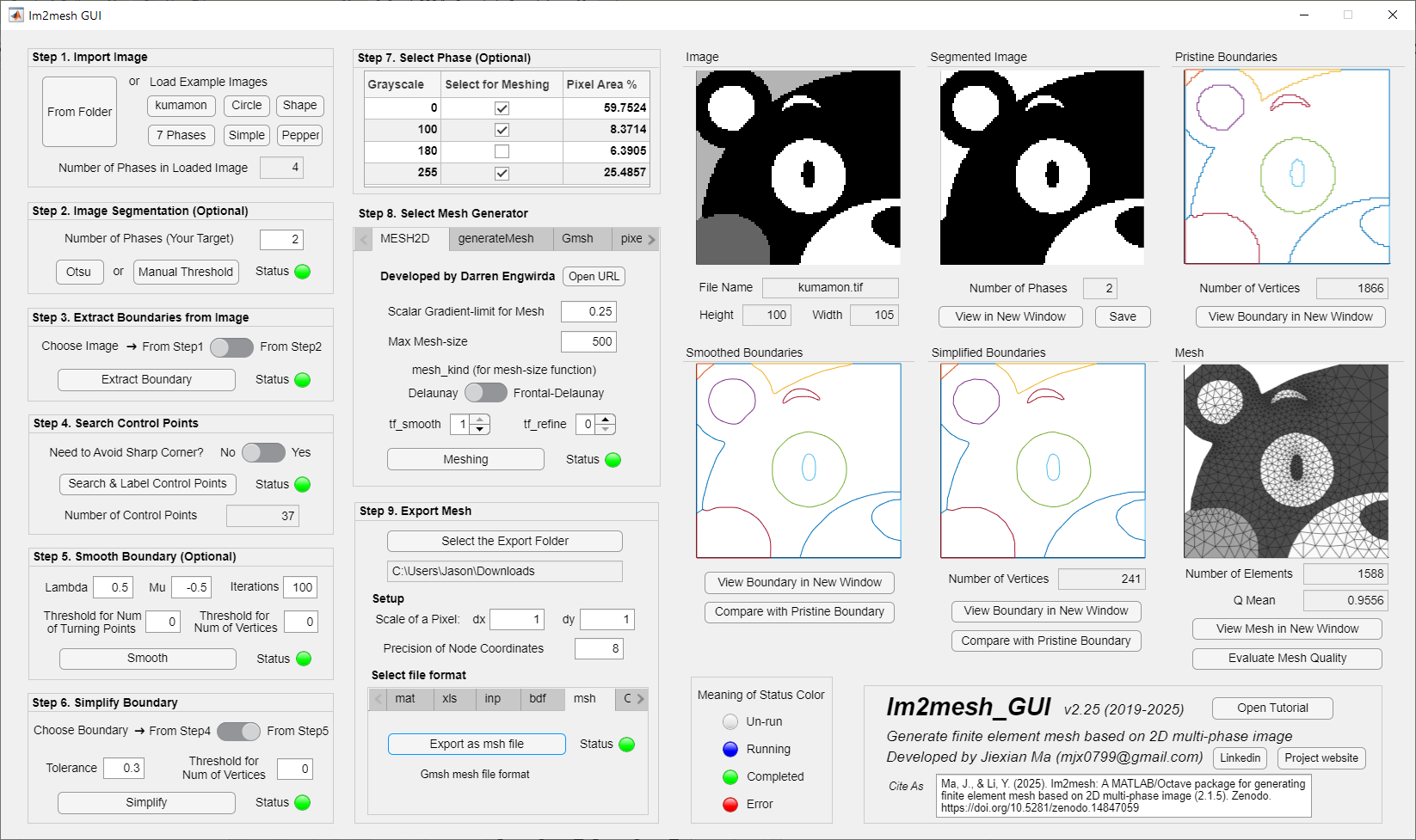
- Graphical user interface (GUI) version is available as a MATLAB app and as a standalone desktop application.
Generated mesh can be exported as:
inpfile with boundary node set (Abaqus)bdffile (Nastran bulk data, compatible with COMSOL)mshfile (Gmsh mesh format)stlfile- For other formats, you can import the generated
mshfile into software Gmsh and then export.
- When using Im2mesh package or Im2mesh_GUI in MATLAB, you need to install MATLAB and the following MATLAB toolboxes: Image Processing Toolbox, Mapping Toolbox.
- When using Im2mesh_GUI as a standalone desktop application, there is no need to install MATLAB or any MATLAB toolboxes.
- When running
demo20of Im2mesh, we need to install fTetWild. No need to install any MATLAB toolboxes fordemo20.
- Im2mesh_GUI: MATLAB R2017b or later; version higher than R2018b is preferred.
- Im2mesh package: MATLAB R2017b or later. GNU Octave 9.3.0 or later.
- Gmsh: tested with version 4.13.1.
After downloading Im2mesh package (releases), I suggest you start with Im2mesh_GUI app in the folder, which will help you understand the workflow and parameters of Im2mesh. A detailed tutorial is provided in Im2mesh_GUI Tutorial.pdf. Note that Im2mesh_GUI is for 2D images.
Then, you can learn to use Im2mesh package in the folder "Im2mesh_Matlab" or "Im2mesh_Octave". 20 examples are provided. demo01 ~ demo18 are for 2D images. demo19 and demo20 are for 3D voxel images.
- If you're using MATLAB, examples are live script
mlxfiles (demo01.mlx~demo20.mlx). If you find some text in themlxfile is missing, please read thehtmlfile instead. - If you're using Octave, examples are
mfiles (demo01.m~demo10.m). - Examples are also available as
htmlfiles in the folder "demo_html". - You can skip
demo04-06anddemo10-11, which are kept for historical reason. - If you're only interested in 3D voxel images, you can skip
demo01-18.
Examples:
- demo01 - Demonstrate function
im2mesh, which useMESH2Das mesh generator. - demo02 - Demonstrate function
im2meshBuiltIn, which use MATLAB built-in functiongenerateMeshas mesh generator. - demo03 - Export: save mesh as
inp,bdf,mshor,stlfile; save image boundary asdxffile, Gmshgeofile, or PSLG data. - demo04 - What is inside function
im2mesh - demo05 - Avoid sharp corner
- demo06 - Thresholds in polyline smoothing
- demo07 - Parameter
hmaxandgrad_limitin mesh generation - demo08 - Function
plotMeshes - demo09 - How to select phases for meshing
- demo10 - Different polyline smoothing techniques
- demo11 - Find node sets at the interface and boundary
- demo12 - Function
pixelMesh(pixel-based quadrilateral mesh) - demo13 - Use
Gmshas mesh generator - demo14 - Use polyshape to define geometry for mesh generation
- demo15 - Edit polygonal boundaries before meshing
- demo16 - Add mesh seeds/nodes
- demo17 - Refine mesh
- demo18 - 2D image to tetrahedral mesh
- demo19 - Function
voxelMesh(voxel-based hexahedral mesh) - demo20 - 3D voxel image to tetrahedral mesh (via fTetWild)
Jiexian Ma
If you use Im2mesh, please cite it as follows. You can click the DOI link below to see other citation styles.
Ma, J., & Li, Y. (2025). Im2mesh: A MATLAB/Octave package for generating finite element mesh based on 2D multi-phase image (2.1.5). Zenodo. https://doi.org/10.5281/zenodo.14847059
Once my paper is published, I will update a new DOI here.
Many thanks to Dr. Yang Lu for providing valuable suggestions and testing of export formats.
This project incorporates code from the following open-source projects. I appreciate the contributions of the original authors. Each incorporated code retains its original copyright.
- MESH2D by Darren Engwirda
- dpsimplify by Wolfgang Schwanghart
- p_poly_dist by Michael Yoshpe
- MeshQualityQuads by Allan Peter Engsig-Karup
- ccma by UniBwTAS
- XtalMesh by Jonathan Hestroffer