Skip to content

"No suggestions" for autocompletion inside a lambda #1265

Closed

Description

@anthonyvdotbe

Sometimes autocompletion is unable to provide suggestions inside a lambda

Environment
  • Operating System: Windows 10
  • JDK version: JDK 13
  • Visual Studio Code version: VS Code 1.42.0
  • Java extension version: 0.55.1
Steps To Reproduce

Copy-paste the code below in a Java file & try autocompletion. Note that autocompletion does work on the line outside the lambda.

import java.util.Map;

class Test {

    static class Employee {

        final String name;

        Employee(String name) {
            this.name = name;
        }

        String name() {
            return name;
        }

    }

    public static void main(String... args) {
        var totals = Map.of(new Employee("John"), 0);
        Employee e = new Employee("Jane");
        //totals.put(e., 0);
        List.of("foo").forEach(item -> {
            totals.put(e., 0);
        });
    }

}
Current Result
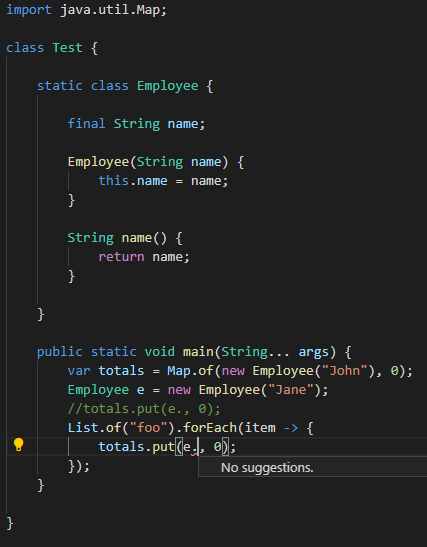
image

Expected Result

Autocompletion provides suggestions.

Activity

  1. snjeza commented on Feb 11, 2020

    @snjeza
    Collaborator

    You have to add:

    import java.util.List;
    
  2. anthonyvdotbe commented on Feb 11, 2020

    @anthonyvdotbe
    Author

    Thanks for pointing out the missing import, I filed a separate issue for the fact that there's no error given for it.

    However, I believe autocompletion should still work in this case, and be much more robust in general, even if the code contains syntax errors. For example in NetBeans (which I"ve been using for years and is far more robust in this regard), the example correctly marks the missing import, but also still gives me autocompletion:

    image

  3. snjeza commented on Feb 11, 2020

    @snjeza
    Collaborator

    We are using Eclipse JDT that behaves the same way.

  4. snjeza commented on Feb 11, 2020

    @snjeza
    Collaborator
  5. fbricon commented on Feb 17, 2020

    @fbricon
    Collaborator

    Apparently, you don't get the error on the missing List import, because you've opened a standalone java file. See https://github.com/redhat-developer/vscode-java/wiki/%22Classpath-is-incomplete%22-warning

    You can try to open the folder containing the Java file instead, and vscode-java will try to make better assumptions and report compilation errors too.

  6. fbricon commented on Feb 17, 2020

    @fbricon
    Collaborator

    Sorry I've been catching up on emails, so I'm a bit late to the party. Now I see you got #1266

  7. vitran96 commented on Apr 21, 2024

    @vitran96

    I also encountered this problem in Smallrye Multiny

    image

    Stack trace from VSCode output:

    Apr 21, 2024 3:27:51 PM org.eclipse.lsp4j.jsonrpc.RemoteEndpoint fallbackResponseError
    SEVERE: Internal error: java.lang.NullPointerException: Cannot invoke "org.eclipse.jdt.internal.compiler.lookup.Scope.getType(char[])" because "scope" is null
    java.util.concurrent.CompletionException: java.lang.NullPointerException: Cannot invoke "org.eclipse.jdt.internal.compiler.lookup.Scope.getType(char[])" because "scope" is null
    	at java.base/java.util.concurrent.CompletableFuture.encodeThrowable(Unknown Source)
    	at java.base/java.util.concurrent.CompletableFuture.completeThrowable(Unknown Source)
    	at java.base/java.util.concurrent.CompletableFuture$UniApply.tryFire(Unknown Source)
    	at java.base/java.util.concurrent.CompletableFuture$Completion.exec(Unknown Source)
    	at java.base/java.util.concurrent.ForkJoinTask.doExec(Unknown Source)
    	at java.base/java.util.concurrent.ForkJoinPool$WorkQueue.topLevelExec(Unknown Source)
    	at java.base/java.util.concurrent.ForkJoinPool.scan(Unknown Source)
    	at java.base/java.util.concurrent.ForkJoinPool.runWorker(Unknown Source)
    	at java.base/java.util.concurrent.ForkJoinWorkerThread.run(Unknown Source)
    Caused by: java.lang.NullPointerException: Cannot invoke "org.eclipse.jdt.internal.compiler.lookup.Scope.getType(char[])" because "scope" is null
    	at org.eclipse.jdt.internal.compiler.ast.SingleTypeReference.getTypeBinding(SingleTypeReference.java:60)
    	at org.eclipse.jdt.internal.compiler.ast.TypeReference.internalResolveType(TypeReference.java:525)
    	at org.eclipse.jdt.internal.compiler.ast.TypeReference.resolveType(TypeReference.java:628)
    	at org.eclipse.jdt.internal.compiler.ast.TypeReference.resolveType(TypeReference.java:624)
    	at org.eclipse.jdt.internal.compiler.ast.LocalDeclaration.resolve(LocalDeclaration.java:287)
    	at org.eclipse.jdt.internal.compiler.ast.LocalDeclaration.resolve(LocalDeclaration.java:258)
    	at org.eclipse.jdt.internal.codeassist.select.SelectionOnLocalName.resolve(SelectionOnLocalName.java:32)
    	at org.eclipse.jdt.internal.codeassist.SelectionEngine$1Visitor.visit(SelectionEngine.java:1469)
    	at org.eclipse.jdt.internal.compiler.ast.LocalDeclaration.traverse(LocalDeclaration.java:488)
    	at org.eclipse.jdt.internal.compiler.ast.Block.traverse(Block.java:148)
    	at org.eclipse.jdt.internal.compiler.ast.LambdaExpression.traverse(LambdaExpression.java:804)
    	at org.eclipse.jdt.internal.compiler.ast.MessageSend.traverse(MessageSend.java:1287)
    	at org.eclipse.jdt.internal.compiler.ast.ReturnStatement.traverse(ReturnStatement.java:415)
    	at org.eclipse.jdt.internal.compiler.ast.MethodDeclaration.traverse(MethodDeclaration.java:458)
    	at org.eclipse.jdt.internal.codeassist.SelectionEngine.selectLocalDeclaration(SelectionEngine.java:1558)
    	at org.eclipse.jdt.internal.codeassist.SelectionEngine.select(SelectionEngine.java:1088)
    	at org.eclipse.jdt.internal.core.Openable.codeSelect(Openable.java:166)
    	at org.eclipse.jdt.internal.core.CompilationUnit.codeSelect(CompilationUnit.java:382)
    	at org.eclipse.jdt.internal.core.CompilationUnit.codeSelect(CompilationUnit.java:375)
    	at org.eclipse.jdt.ls.core.internal.JDTUtils.findElementsAtSelection(JDTUtils.java:1036)
    	at org.eclipse.jdt.ls.core.internal.JDTUtils.findElementAtSelection(JDTUtils.java:1017)
    	at org.eclipse.jdt.ls.core.internal.handlers.FindLinksHandler.findLinks(FindLinksHandler.java:46)
    	at org.eclipse.jdt.ls.core.internal.handlers.JDTLanguageServer.lambda$11(JDTLanguageServer.java:728)
    	at org.eclipse.jdt.ls.core.internal.BaseJDTLanguageServer.lambda$0(BaseJDTLanguageServer.java:87)
    	... 7 more
  8. robstryker commented on Oct 29, 2026

    @robstryker
    Contributor

    When the lambda reads e and it does not read e. I am able to see an error indicating the missing import of java.util.List.

    When the List class is properly imported, I am able to see suggestions for completion.

    Image

    Works for me.

Sign up for free to join this conversation on GitHub. Already have an account? Sign in to comment

Metadata

Metadata

Assignees

No one assigned

    Type

    No type

    Projects

    No projects

      Milestone

      No milestone

      Relationships

      None yet

      Development

      No branches or pull requests

      Issue actions